What Is a Streamer in an Audio System? A Plain Explanation
Audio equipment has a habit of using words that mean something different from what you would expect. One of the newer ones is streamer. It sounds like something for broadcasters, but in a home audio system it refers to a small component that brings sound from a network to the rest of your equipment. This article explains what a streamer is, how it fits in with an amplifier, and how to think about it, with reference to the Fosi Audio streamer information on its amplifier collection page.
A note about what the page does and does not say
Before going further, it is worth being clear. The Fosi Audio amplifier collection page promotes an S3 Lite Streamer in a banner, but the streamer is not listed among the products on that page, and the page describes streamers only in general terms. This article therefore does not give specifications for any particular streamer. Instead it explains the idea in general, and it describes the amplifiers that the page does list.
What a streamer does
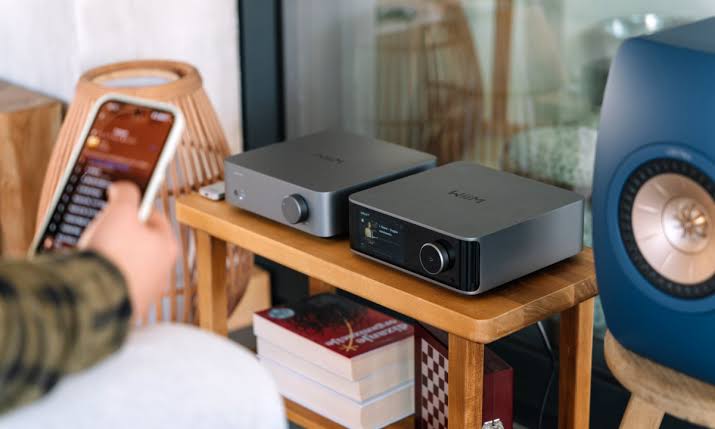
A network streamer is a device that receives digital audio over your home network, through WiFi or a network cable, and passes it on to other equipment. It can take content from the internet or from a device on your network, and it sends it to a DAC or an amplifier, which turns it into sound you can hear through speakers or headphones.
In that sense, it is a bridge between your network and your audio system. Without one, you would need to connect a computer or phone to the amplifier with a cable or Bluetooth. A streamer makes that connection cleaner and often easier to control from a phone or tablet.
What it can carry
A streamer can carry any digital audio. That includes spoken programs, talks, lectures, recitations, news and radio style broadcasts, depending on the services and software it supports. Which services it can play depends on the particular product, so always check the maker’s information before you buy.
How it fits with an amplifier
A streamer on its own does not make sound. It needs a DAC, which may be built in or separate, and an amplifier to drive speakers. The Fosi Audio collection page lists several amplifiers that can serve as the other half of such a system.
For example, it lists the ZA3 Balanced Stereo Amplifier, a Class D amplifier with 155 W by 2 in stereo or 235 W in mono at 4 ohms, XLR and RCA inputs and room for five op amp upgrades. It lists the V3 Mini Stereo Amplifier, rated 300 W by 2 at 4 ohms, and the V3 Mono Monoblock Power Amplifier, rated 240 W at 4 ohms. For systems with a subwoofer, it lists the BT30D Pro, a 2.1 channel Bluetooth amplifier rated 165 W by 2 plus 350 W at 4 ohms.
It also lists integrated models with a DAC. The MC351 is a 2.1 channel integrated amplifier with USB at 24 bit and 96 kHz, optical and coaxial inputs at 32 bit and 192 kHz, Bluetooth 5.3, RCA and a VU meter. The MC331 is a tube integrated amplifier with a DAC and connections including USB, optical, coaxial, Bluetooth and RCA. A streamer with a digital output could be connected to a DAC input of this kind, but check the manufacturer’s information on compatibility before you decide.
Why people use streamers
The main reason is convenience. A streamer lets you control playback from a device you already own, and your computer does not need to stay connected to the amplifier. Another reason is separation. Keeping a computer away from the audio equipment can reduce electrical noise. A streamer can also be placed near the amplifier, wherever the network reaches.
What to look for
Check the connections first. A streamer should have an output that your DAC or amplifier accepts, such as optical, coaxial, USB or analog. Check network options, meaning WiFi, wired network or both. A wired connection is usually steadier.
Check the control method. Some streamers are operated by a phone app, others by a web page or a remote. Read about the app, because that is what you will use every day. Check which formats and services are supported, and whether updates are provided by the manufacturer.
Finally, check your own network. A weak WiFi signal causes interruptions, so make sure the streamer is within good range or use a cable.
Do you need one?
Not everyone does. If you are happy connecting a computer or phone by cable or Bluetooth, a separate streamer adds cost you may not need. It becomes attractive when you want a tidy setup, remote control from a phone or a dedicated device that is always ready.
Safety and care
Keep the unit ventilated and away from water. Use the power supply provided. Change default passwords on your network and keep the device software updated, because anything connected to the internet should be kept secure.
Summary
A streamer connects your network to your audio system. It does not replace an amplifier or speakers, but it can make a system simpler and more convenient. Before buying, confirm which connections, services and formats are supported, and read the product information carefully. The amplifier collection from Fosi Audio shows the range of amplifiers a streamer might be paired with, though you should check compatibility for any specific product.