How to Use an AI Text Cleaner Before Publishing
On May 18, 2025, the Chicago Sun-Times ran a summer reading list with 15 books on it. Ten of them didn’t exist (CBS News, 2025). Now picture that list going through a text cleaner first. The quotes would be straight, the spacing perfect, and all ten imaginary novels would still be sitting there, looking very publishable.
A cleaner can’t catch that kind of mistake, and it was never built to. What it does catch is the smaller, sillier stuff: stray asterisks in a live headline, a weird space that wrecks the mobile layout. So the useful questions are when to run one, on what setting, and what’s still your job afterward.
What a Text Cleaner Fixes, and What It Leaves to You
AI drafts pick up mess on the trip from chat window to CMS. Copied markdown. Non-breaking spaces. Zero-width characters that take up no room on screen but still confuse searches, word counts and code.
This stuff gets through more often than you’d guess. In NP Digital’s 2026 survey of 565 US digital marketers, 36.5% said hallucinated or incorrect AI content had gone live. Formatting glitches that broke the user experience were nearly as common among those public mistakes as outright false information.
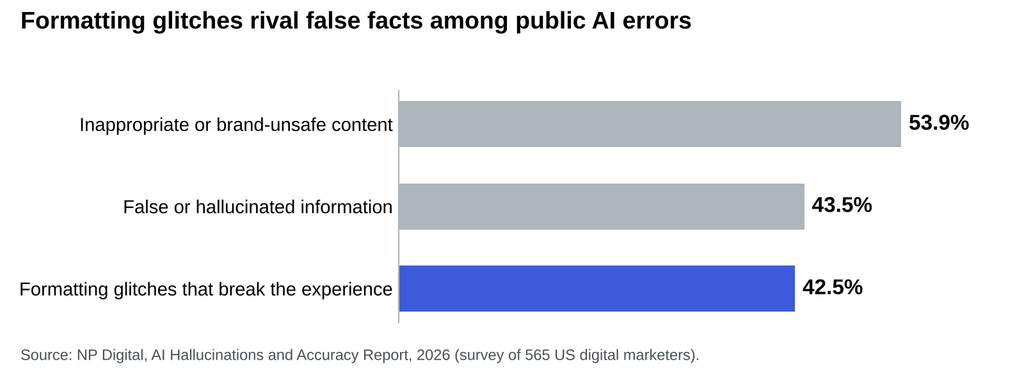
Types of AI errors that reached the public, as reported by US digital marketers. Source: NP Digital, AI Hallucinations and Accuracy Report, 2026 (n=565).
A cleaner can help with the blue bar. For the two grey ones, you need a person who actually reads the draft. Most teams are already stretched there: in Optimizely’s 2026 study of 2,003 marketing leaders, 76% said they spend at least three hours a week editing, fact-checking or correcting AI output. Any mechanical work you can hand off helps.
Two Types of Cleaner, Two Different Risks
Rule-based cleaners run fixed find-and-replace rules and leave your wording alone. Rewriting cleaners go further. Phrasly’s AI text cleaner belongs to the second group: it removes formatting issues and rewrites for readability while aiming to keep your original meaning.
| Factor | Rule-based cleaner | Rewriting cleaner |
| What changes | Characters, spacing, markdown | Characters, wording and flow |
| Best for | Copy you’ve already approved | Stiff drafts that need polish |
| Main risk | Stripping a character you wanted | Altered facts, terms or tone |
| Your check | Scan the list of changes | Compare line by line |
A Six-Step Routine for Cleaning AI Text Before It Goes Live
Step 1: Verify the Facts First
Polished copy is harder to doubt, so do your fact-checking while the draft still looks like a draft. Google made the point directly on October 1, 2026, when it updated its Search Central guidance to call it “critical to manually factcheck” AI content before publishing (as reported by PPC Land, 2026). That review also covers title elements, meta descriptions, structured data and image alt text. Google didn’t announce any ranking change with the edit. I’d follow the advice anyway.
Go through every number, name, quote and link. Open the sources. If a citation won’t load, cut the claim or find a real one.
Step 2: Lock What Can’t Change
Before any tool touches the draft, write down what has to survive word for word:
- Product names and approved terminology
- Statistics, dates and prices
- Legal qualifiers and disclaimers
- Target keywords and calls to action
Phrasly’s guide to cutting editing time without losing brand voice makes this step one. Direct quotes need extra care, so I’d pull them out before a rewrite and paste them back afterward.
Step 3: Choose the Lightest Setting That Solves the Problem
More intensity means more to review, so start low. Phrasly offers three levels.
Easy, for near-final copy
Minimal changes, mostly clearing obvious formatting issues. If you’ve already edited the piece and like how it reads, stop here.
Medium, for professional content
A balance between natural flow and removal, which suits most blog posts, reports and client work.
Aggressive, for stiff drafts
Phrasly positions this level for content where natural tone matters most. It’s also the one I’d compare most carefully afterward.
The free plan handles up to 2,500 words at a time, 10 times a day, and premium plans raise that to 5,000 words per run. Working on something longer? Clean it section by section, which also makes the review easier.
Step 4: Compare the Output Against Your Original
Don’t skim this part. Word’s Compare feature will mark every change between two versions in a minute or so. Then look for the small edits that quietly change meaning:
- “May reduce” turning into “reduces”
- A dropped “not” or “only”
- Rounded numbers or shifted dates
- Your approved term swapped for a synonym
- Links that lost their anchor text
Phrasly’s own page warns that the tool can make mistakes and asks you to double-check the output. Take that literally. If the piece leans heavily on outside sources, a pass through a plagiarism checker will show whether any passage still sits too close to the original, though each match needs judging in context.
Step 5: Hunt for Leftover Characters
Phrasly’s page doesn’t itemize which characters it targets, and plenty of tools are vague here, so confirm the result yourself. Paste the text into a code editor such as VS Code, which highlights many invisible Unicode characters, or switch on the ¶ formatting marks in Word.
The usual suspects are the zero-width space (U+200B), the no-break space (U+00A0) and the narrow no-break space (U+202F). Replace the two space characters with a normal space. Delete them outright and two words fuse.
Careful, though, because some of these characters belong there. Zero-width joiners hold many emoji together, and Persian text depends on non-joiners. Curly quotes are correct typography on most published pages, so straighten them only if your CMS or house style demands it.
Step 6: Preview It Where Readers Will See It
A clean document can still break in your CMS. Open the preview on a phone and on a desktop. Check headings, bullets, tables, and every link, then give the title tag, meta description, and alt text the same treatment as the body. Last, read the opening paragraph out loud. You’ll hear what your eyes have stopped noticing.
Why Clean Text Won’t Settle Your AI Detection Score
Plenty of cleaners advertise themselves as a way past AI detectors. The evidence isn’t encouraging. Originality.ai ran a small test in 2025, adding invisible characters to one AI sample and stripping them from another, and most tools detected the content either way. Two samples can’t prove much, but the result makes sense. Detectors mostly look at language patterns, and swapping a space doesn’t touch your sentences.
So use Phrasly’s built-in Check for AI as a signal for where a draft still sounds mechanical, and fix those passages by adding what only you can add, such as a real example, a firm opinion or a detail from your own work. And if a client, publisher or institution requires you to disclose AI use, cleaning doesn’t change that obligation. Disclose it.
Clean Late, Check Everything, Then Hit Publish
A few minutes with a search bar would have spared the Sun-Times that apology. No cleaner was going to do it. So let the tool deal with spaces and stray symbols, and spend your attention on whether the piece is true and sounds like you.
Keep the order simple. Verify the facts, lock what can’t change, clean at the lightest setting that works, compare the versions, sweep for stray characters, and preview the live page. Try it on your next draft and time yourself. The first run will feel slow. By the third, you probably won’t think about it much.