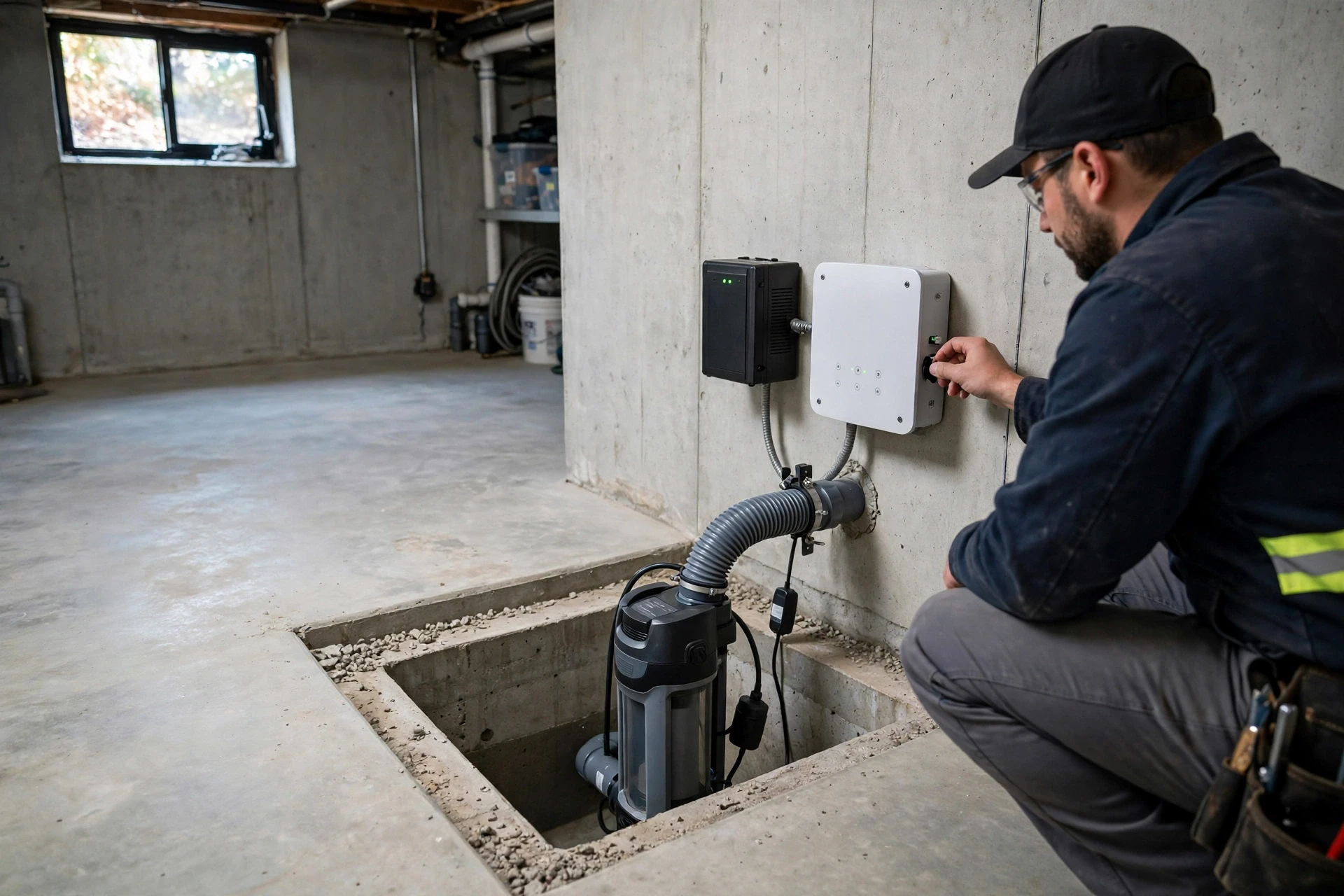
Smart Residential Sump Pump Monitoring Systems With Automatic Backup Power Protection
A sump pump only matters on the worst day of the year, and that is exactly when it is most likely to fail. Heavy rain soaks the soil around your foundation, the water table rises, the pit fills, and then the power goes out, the float switch sticks, or the pump quietly burns out after years of sitting idle. Homeowners often discover the failure only when water is already spreading across the basement floor, soaking drywall and ruining stored belongings. A smart monitoring system with automatic backup power exists to close the gap between failure and discovery.
In plain terms, a smart sump pump monitoring system pairs sensors and a connected controller with a battery-powered backup pump. The monitor tracks water level, pump cycles, power status, and battery health, then sends alerts to your phone by text, email, or app notification. The backup pump, running on a deep-cycle battery, starts automatically when water rises past the trigger point or when the primary pump loses power. Together, monitoring and backup turn a silent basement appliance into a supervised system you can check from anywhere.
The Basement Problem Smart Sump Monitoring Was Built to Solve
Most sump pumps live out of sight and out of mind. A typical primary pump may sit in a pit for months without running, then be asked to cycle dozens of times during a single storm. The common failure points are well known to plumbers: a float switch jammed by debris, a check valve that sticks open and lets water flow back into the pit, a clogged intake screen, a tripped breaker, and a power outage that arrives with the same storm that is filling the pit.
The damage from one basement flood is rarely limited to the water itself. Wet drywall wicks moisture upward, flooring swells and buckles, and anything stored at floor level is often a total loss. A monitoring system changes the timing of the whole event: instead of discovering a flood the next morning, you get an alert the moment the water level climbs, while there is still time to act.
- Float switches jam or drift out of adjustment after years of vibration and debris buildup.
- Power outages arrive with the same storms that fill the sump pit fastest.
- Check valves stick open, so pumped water flows back and forces endless cycling.
- Discharge lines freeze or clog in winter, leaving the pump with nowhere to send water.
- A pump that never runs can seize quietly, and nobody finds out until the pit overflows.
How Smart Sump Pump Monitoring Systems Actually Work
A smart monitoring system is built from four parts: sensors in the pit, a controller on the wall, a backup pump with its own battery, and a communication link to your phone. Level sensors measure how high the water rises and how quickly. The controller reads those sensors, runs the pump, and logs every cycle. It also watches the power supply and the battery, and it can run a scheduled self-test that briefly starts the pump to confirm it still moves water.
When something goes wrong, the controller raises an alert through home Wi-Fi or, on some models, a cellular connection. Typical alerts cover high water, power outage and restoration, pump activation, pump faults, switch faults, and low battery. Some systems let you choose exactly which events trigger a push notification. More advanced controllers offer two-way communication, so a homeowner or a designated contractor can remotely test the pump and review recent cycles from a phone or computer.
Battery Backup Power That Takes Over Before Water Rises
Automatic backup power is the half of the system that does the physical work when the primary pump cannot. The most common design is a 12-volt DC backup pump mounted beside the primary pump in the same pit, powered by a deep-cycle marine or AGM battery and managed by a charger that keeps the battery topped up. When water rises to the backup float level, or when the controller detects that the primary pump has lost power or failed, the backup pump starts on its own.
Battery runtime depends on the pump, the battery size, and how fast water enters the pit. Manufacturer figures for popular systems range from roughly six hours of continuous running to a day or two of intermittent storm duty, and dual-battery setups stretch that further. A home with a high water table that cycles the pump every few minutes needs far more reserve than a home where the pump runs only during rare heavy rain.
Choosing Between DC Backup Pumps and Inverter Backup Systems
Homeowners choosing a backup system face two main designs. A dedicated DC backup pump is a second, smaller pump that sits in the pit and runs directly from the battery. An inverter system instead converts battery power back to mains-style AC power so the existing primary pump keeps running during an outage. Both are automatic, but they behave differently when the storm lasts longer than expected.
| Feature | DC Backup Pump | Inverter Backup System |
|---|---|---|
| How it works | Second 12-volt pump runs straight from the battery | Inverter converts battery DC to AC for the main pump |
| Pump used in outage | Smaller backup pump, lower flow rate | Full-size primary pump at normal capacity |
| Runtime on one battery | Longer, smaller pump draws less power | Shorter, main pump draws more power |
| Best for | Moderate inflow and a standard pit | High inflow or a single large pump |
| Typical cost | Lower upfront cost | Higher upfront cost |
A DC backup pump is the simpler and more common choice for most homes, and it is usually the right one when the pit has room for a second pump and the inflow rate is moderate. An inverter system makes sense when the primary pump is oversized for a reason, such as a basement that takes on water very quickly, or when the pit is too narrow for two pumps.
Setting Up Alerts Your Phone Will Actually Wake You For
A monitoring system is only useful if its alerts reach you at the moment they matter. Most controllers connect through home Wi-Fi and send push notifications, texts, or emails, while some higher-end models add a cellular link that keeps working when the home internet router loses power. If your basement floods during a storm that also knocks out broadband, a cellular communicator is the only channel that still gets through, so it is worth considering in areas with frequent outages.
Alert fatigue is a real problem. A system that pings you every time the pump cycles will train you to ignore it, and the one alert that matters will be swiped away with the rest. Configure the system so routine cycles are logged silently and only genuine problems interrupt you: high water, power loss, pump failure, switch faults, and low battery.
Sump Pump Battery Care That Keeps Backup Power Ready
A backup battery is a consumable, and it fails gradually rather than all at once. Flooded deep-cycle marine batteries need their water levels checked a few times a year, and the terminals need cleaning so corrosion does not add resistance to the circuit. AGM batteries are sealed and maintenance-free, but they still age, and their capacity fades after several years. Most manufacturers suggest replacing a backup battery every three to five years, and a controller with self-testing can flag a battery that no longer holds a charge.
Testing should be routine, not occasional. Many smart controllers run an automatic weekly test that briefly starts the backup pump. Once or twice a year, do a fuller check yourself: unplug the primary pump, pour water into the pit until the backup float triggers, and confirm the backup pump actually moves water and the alarm sounds. Then restore power and confirm the charger brings the battery back to full charge.
- Check flooded battery water levels every few months; top up with distilled water only.
- Clean corroded terminals with a wire brush and a thin coat of petroleum jelly.
- Replace the battery every three to five years, or sooner if self-tests report falling capacity.
- Keep the battery off a cold concrete floor on a shelf or riser to reduce temperature swings.
Sump Pump Monitoring Mistakes That Leave Basements Unprotected
The most common mistake is installing a smart monitor and then assuming the job is done. A monitor reports problems; it does not fix a discharge line that terminates against the foundation wall, a check valve installed backwards, or a pit lid that lets debris fall onto the float switch. Walk the whole system at least once a year, from the pit to the point where the discharge leaves the property.
Another frequent error is placing the sensor or float at the wrong height. If the backup float is set too low, the backup pump runs during every storm and wears out early; set it too high, and water is already near the floor before the backup starts. The backup trigger should sit clearly above the primary pump’s trigger point but well below the floor level. A related mistake is relying on Wi-Fi alone for alerts in a home where the router sits in the basement and loses power with everything else.
When Sump Pump Backup Work Belongs to a Licensed Electrician or Plumber
Some parts of a sump pump installation are reasonable DIY work, and some are not. Running a discharge line, fitting a check valve, or replacing a float switch is within reach of a careful homeowner. Electrical work is a different matter: a sump pump circuit needs a dedicated, properly grounded outlet with ground-fault protection, and any new circuit or panel work should be done by a licensed electrician. Water and electricity in the same pit is not a combination to improvise with.
Call a licensed plumber when the pit itself needs work, such as enlarging it, adding a second pump, or rerouting the discharge through a wall, because mistakes there can send water back toward the foundation. Also bring in a professional if the basement floods repeatedly despite a working pump, since that points to a drainage or grading problem outside the pit that no pump can solve. If your area requires a permit for electrical or plumbing changes, get it before the work starts.
Smart Sump Pump Monitoring FAQs: Backup Power, Alerts, and Battery Life
How long will a battery backup sump pump run during a power outage?
It depends on the pump, the battery, and how fast water enters the pit. Many systems provide roughly six hours of continuous running, which translates to one or two days of intermittent storm duty, and a second battery roughly doubles that.
Will a smart sump pump monitor work if my Wi-Fi goes down?
Wi-Fi-based alerts stop when the router loses power, unless the system has a cellular communicator or a battery-backed router. Models with a cellular link keep sending alerts through the mobile network during an outage, which is worth having in areas with frequent power cuts.
Do I still need a backup pump if I already have a smart monitor?
Yes. A monitor only reports problems; it cannot move water. The monitor tells you the primary pump has failed, but without a backup pump the water keeps rising while you arrange help. Monitoring and backup solve different halves of the problem.
What size battery does a backup sump pump need?
Most systems use a 12-volt deep-cycle marine or AGM battery of at least 75 amp-hours, and larger batteries give longer runtime. Check the pump manufacturer’s recommendation for your model, because an undersized battery will run flat quickly.
How often should I test my backup sump pump?
Let the controller run its automatic weekly self-test, and do a full manual test at least twice a year: unplug the primary pump, add water until the backup float triggers, confirm the backup pump moves water and the alarm sounds, then restore power and confirm the battery recharges.
Can a smart sump pump monitor detect a stuck float switch?
Many can. Controllers that track pump cycles and water level can flag a switch that never triggers, one that sticks on and runs the pump dry, or a pump that cycles far more often than normal. Dual float switches add a second layer, so one stuck switch does not leave the system blind.
Is a water-powered backup pump a good alternative to a battery system?
It can be a useful third layer where municipal water pressure is strong and local codes allow it, because it needs no electricity at all. However, it uses a large volume of municipal water while running and cannot match an electric pump’s flow rate, so treat it as a supplement rather than a replacement.
Final Thoughts: Is Smart Sump Pump Monitoring Worth It for Your Basement?
For any home with a sump pit, the answer is usually yes, and the reason is timing. A flood discovered hours late costs far more than the monitoring system, the battery, and the backup pump combined. Install the system, size the battery for your real water load, test it twice a year, and replace the battery before it ages out.